Black Forest Labs announced FLUX 3 on July 23, 2026.
This release is a bigger shift than a normal FLUX version bump. BFL is positioning FLUX 3 as a single multimodal foundation model for images, video, audio and action prediction.
These are our working notes on what FLUX 3 can actually do, what is available today, and what kinds of prompts seem to bring out the interesting behavior.
Planegraph follows new image, video and audio model releases closely because our workflow editor is built around combining models in production pipelines.
What FLUX 3 is
BFL describes FLUX 3 as a multimodal model trained jointly on images, video and audio. Instead of treating image generation, video generation and audio generation as separate systems, FLUX 3 is designed to learn one representation of the physical world: how objects look, how they move and how events sound.
The official launch post says FLUX 3 can create video with native audio up to 20 seconds in a single generation. BFL lists text-to-video, image-to-video, video-to-video, video and audio continuation, keyframe-to-video, multilingual dialogue, broad aspect ratio support, typography and longer multi-shot chaining as core video capabilities.
Current availability
As of July 28, 2026:
- FLUX 3 is in early access.
- FLUX 3 Video is the headline capability today: text-to-video, image-to-video, video-to-video, keyframe transitions and native audio.
- FLUX 3 Image has been announced, but Black Forest Labs says image early access will open "in the following weeks."
- FLUX 3 Dev, the planned open-weight multimodal backbone, is announced but not dated beyond the broader "weeks and months" launch plan.
- There is no firm public release date for general API access or open weights.
What it seems strong at
The most interesting early signal is diversity. Many recent video models collapse toward the same glossy cinematic look. The FLUX 3 examples we have seen are more varied: CCTV, handheld footage, classroom nostalgia, split-screen physical tests, product-ad style camera movement and dialogue-oriented scenes.
The second signal is event understanding. Several examples stress synchronized cause and effect: a bottle falls and gets caught, a dog emerges through a hedge at the exact moment two paths meet, a bicycle crosses the waterline in one camera only when it crosses in the other. These are hard prompts because they test object permanence, timing, occlusion and physical continuity at the same time.
Native audio is also central. BFL says all listed FLUX 3 Video outputs include audio generation. That matters because a model trained to generate video and sound together should, in theory, be better at matching sound to visible physical events than a pipeline that creates silent video first and adds audio afterward.
What is still unclear
BFL's benchmark claims should be read carefully. The launch post says FLUX 3 was preferred over Seedance 2.0 and Gemini Omni Flash in 52% of comparisons, which is close enough that it does not say much on its own. It also reports stronger wins over models like Runway Gen-4.5 and Luma Ray 3.2. Those numbers are interesting, but BFL says the model and evaluation harness are still in development, and the public post does not give enough detail about the prompts, raters or scoring process to treat them as a final ranking.
There are also open questions that matter for real workflows:
- Will general API access arrive in days, weeks or months?
- Will FLUX 3 Image match the video model's diversity?
- How large will FLUX 3 Dev be?
- Will open weights be practical on consumer GPUs?
- What will the commercial license allow?
- How much quality will survive distillation into any open-weight model?
For now, the honest answer is that the full early-access model is the thing people are reacting to. The future Dev release may behave differently.
Prompting guide for FLUX 3
BFL's own prompting docs for current FLUX models recommend clear natural language, starting with the image or scene you want, and iterating one important detail at a time. For FLUX 3 Video, the same principle applies, but the prompt needs to specify time, camera behavior, continuity and sound.
A useful FLUX 3 video prompt usually contains:
- Scene and subject: where the action happens and who or what is present.
- Camera grammar: static camera, handheld, CCTV, drone, split-screen, lens height and framing.
- Timeline: what happens at specific seconds.
- Physical constraints: object positions, occlusion, reflections, lighting and cause-effect rules.
- Audio cues: dialogue, environmental sound, impact sounds and whether audio should sync with motion.
- Negative constraints: no cuts, no duplicate objects, no timing offset, no camera change.
The clips below are most interesting when you read them as continuity tests: same event, multiple views, controlled timing, hidden information and small physical consequences.
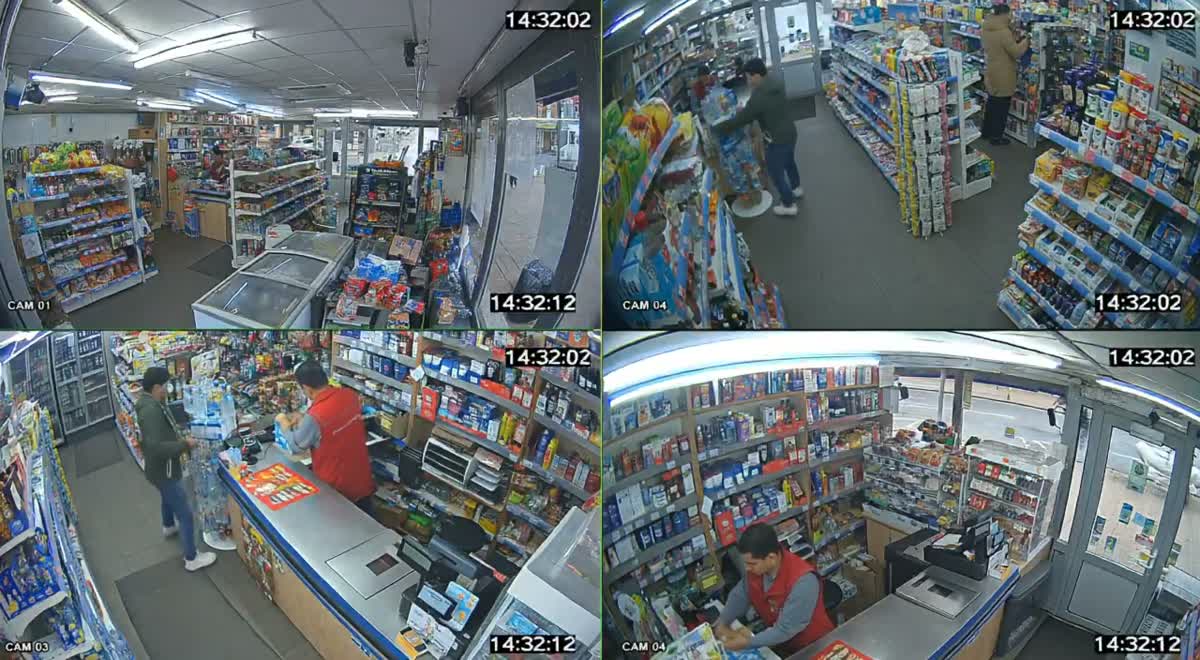
Example 1: synchronized CCTV
Four-way CCTV-style split-screen showing the same real-time event inside a convenience shop. Divide the frame into four equal security-camera views with timestamps. Top left: wide ceiling-corner view covering aisles, entrance, and cashier. Top right: overhead view above the central aisle. Bottom left: camera facing the checkout counter. Bottom right: camera near the entrance looking inward. At the 2-second mark, a customer takes a boxed item from a shelf, accidentally bumps a display, catches one falling bottle, then places the box on the checkout counter. The cashier turns, scans it, and hands over a receipt as another shopper crosses behind them. All four views must remain perfectly synchronized, showing identical people, movements, object positions, occlusions, timestamps, lighting, and physical reactions. Use realistic low-resolution CCTV footage, slight lens distortion, fixed cameras, and no cinematic camera movement.Source note: prompt collected from Umesh on X.
Why it matters: this tests whether the model can maintain one event across four simultaneous views. It is a much harder task than generating four unrelated security-camera shots.
Example 2: two-camera cat jump
Split-screen video showing the same real-time action from two different camera angles. The screen is divided vertically into two equal halves. On the left side, show a static, wide overhead view from a ceiling-mounted camera in the back corner of the room. The full room layout is visible: a couch, coffee table, rug, bookshelves, and a tall shelf near the wall. The cat is perched on top of the shelf. At the 2-second mark, it suddenly jumps, flips mid-air above the furniture, and lands gracefully on the coffee table. On the right side, show the same action in perfect sync from a side, eye-level camera placed low beside the couch. The view includes the shelf, the space between, and the coffee table. The camera follows the cat's leap, capturing body motion, twist, and landing. Both sides must be precisely synchronized, showing the exact same event from different angles with consistent lighting, physics, and timing.Why it matters: animal motion is a common failure point. The split-screen format also exposes mismatched timing immediately.
Example 3: hidden information across two views
Split-screen video. Two equal vertical halves. Both halves show the SAME event, at the SAME time, frame-synchronized, filmed by two different cameras. SCENE: A quiet street, daytime. A long tall hedge wall runs along the sidewalk, too tall to see over. There is one narrow gap in the hedge ahead. A woman in a red jacket walks alone along the sidewalk on the near side of the hedge. On the FAR side of the hedge is an open grass field, where a large golden dog runs. LEFT HALF - CAMERA A: ground-level tracking shot on the sidewalk, following the woman from behind at shoulder height. IMPORTANT: from this camera, only the woman, the sidewalk, and the hedge wall are visible. The field, the dog, and anything behind the hedge are NEVER visible in the left half. The street looks calm and empty. RIGHT HALF - CAMERA B: aerial top-down drone shot, directly above, moving with the woman. This view shows BOTH sides of the hedge at once: the woman on the sidewalk, the hedge as a thin green line, and the golden dog sprinting across the field on the other side, on a converging path toward the gap in the hedge. ACTION - identical timing in both halves: 0-8s: The woman walks calmly. LEFT: peaceful, nothing unusual. RIGHT: the dog races closer and closer to the gap, its path and the woman's path clearly about to meet. 8-11s: The woman reaches the gap. The dog bursts through it. LEFT: the dog appears suddenly from nowhere, a total surprise; the woman flinches. RIGHT: the meeting looks perfectly predictable, two paths joining. 11-15s: The dog jumps up joyfully; it is her own dog greeting her. She laughs, kneels, and hugs it. Both halves show this ending. RULES: Same woman, same dog, same timing in both halves. The dog is visible ONLY in the right half until 8s. No cuts, no other people, no cars.Source note: prompt collected from Umesh on X.
Why it matters: this tests occlusion and camera-specific knowledge. The model has to know what each camera can and cannot see.
Example 4: waterline continuity
15-second split-screen video, two equal vertical halves, one continuous take, no cuts. Both cameras show the same event at the same time, perfectly frame-synchronized. Scene: Calm lake at dusk. An old fisherman in a small wooden rowboat pulls a rope from the water. Left: Water-level camera from another boat. Show only the fisherman, boat, rope above water, ripples, and splashes. Nothing below the waterline is visible. Right: Underwater camera looking up. The rope leads to a sunken bicycle tangled in glowing green weeds, surrounded by small silver fish. 0-6s: The fisherman pulls. Left: he strains and the boat rocks. Right: the bicycle rises with every matching tug. 6-11s: A violent jolt. Left: he nearly falls backward. Right: a wheel catches on a rock, then pops free on the exact same frame. Fish scatter. 11-15s: The bicycle crosses the surface continuously. It must appear above water on the left only when that exact part crosses the waterline on the right. Both halves must match its height, angle, motion, rope tension, splashes, and timing frame by frame. Once fully raised, the fisherman stares, then laughs. No duplicate bicycle, broken rope, teleporting, timing offset, or camera change.Source note: prompt collected from Umesh on X.
Why it matters: this is a continuity torture test. The waterline forces the model to reconcile two camera views with one shared hidden object.
Example 5: rainy restaurant micro-action
Split-screen video showing the same continuous real-time event from two different camera angles. The screen is divided vertically into two equal halves. On the left side, show a static, elevated wide shot of an outdoor cafe terrace during light rain. The full scene is visible: several tables, wet pavement, a large striped umbrella, a waiter carrying a tray with three transparent glasses of differently colored drinks, and a cyclist approaching from the background. Reflections of the people, tables, and umbrella are visible on the wet ground. At the 2-second mark, the cyclist passes close to the waiter, causing the waiter to pivot sharply without falling. The tray tilts, one glass slides toward the edge, and the waiter catches it with the opposite hand just before it drops. A small amount of liquid spills from the glass, arcs through the air, and splashes onto the pavement. At the same moment, a gust of wind lifts and twists the loose edge of the striped umbrella. On the right side, show the exact same event in perfect synchronization from a moving, waist-level camera positioned near the cafe entrance. The camera tracks sideways with the waiter, briefly losing sight of the sliding glass as it passes behind the waiter's arm, then revealing it again as it is caught. The cyclist crosses the foreground, partially occluding the waiter for a fraction of a second. The colored liquid, tray angle, hand positions, clothing movement, umbrella motion, and pavement reflections must remain consistent with the left-side view. Both sides must depict the identical event with matching timing, character appearance, object positions, trajectories, lighting, reflections, weather, and physical consequences. No duplicated objects, disappearing items, changed drink colors, inconsistent hand movements, or mismatched cyclist positions.Why it matters: this prompt combines small-object motion, occlusion, weather, reflections and camera movement. Most weak video models lose at least one of those.
Example 6: retro classroom prompt
elementary school students in the '90s predicting how we'll use computersSource note: prompt collected from Venture Twins on X.
Why it matters: this is the opposite of the multi-camera prompts above. It shows whether the model can expand a short cultural premise into a complete scene.
Additional examples
The local source folder did not include exact prompts for these two clips, so treat them as visual examples rather than reproducible prompt recipes.
Prompt patterns that seem to work
For FLUX 3 video prompting, the most reliable pattern is to write like a director plus a continuity supervisor:
[format and camera]
One continuous 12-second handheld shot from waist height. No cuts.

[scene]
A crowded night market after rain, neon signs reflected in puddles, one vendor flipping skewers.

[action timeline]
0-4s: the vendor turns the skewers and steam rises.
4-8s: a customer opens a red umbrella and walks through the foreground.
8-12s: the vendor laughs, hands over a paper tray, and the customer walks away.

[consistency rules]
Keep the same vendor, stall layout, umbrella color, steam direction, puddle reflections and background crowd positions. The umbrella should briefly occlude the vendor, then reveal the same pose and tray position. Native audio should include rain, crowd noise, sizzling food and a short laugh.The key is constraint density. Tell the model what should stay invariant across time.
Bottom line
FLUX 3 is promising because it targets the hard part of video generation: consistent events across time, camera angle and sound. The most useful early examples are the multi-camera, object-continuity and hidden-information prompts where failure is obvious.
The release status is still early. FLUX 3 Video is in early access, FLUX 3 Image is expected to enter early access in the following weeks, and FLUX 3 Dev is planned over the following weeks and months. Until broad access arrives, the best move is to study the prompt patterns, save the examples that reveal real strengths and weaknesses, and be skeptical of any source that turns a launch plan into a guaranteed public release date.